 SuNight
From sunset to a starry night, without a single jump.
Lightroom Classic applies one setting per photo, never a setting that evolves. SuNight computes, for each of your hundreds of photos, an exposure, a white balance and settings that glide smoothly from one keyframe to the next, and removes flicker.
Windows 10 & 11 · 50 photos · no credit card
 DayNight
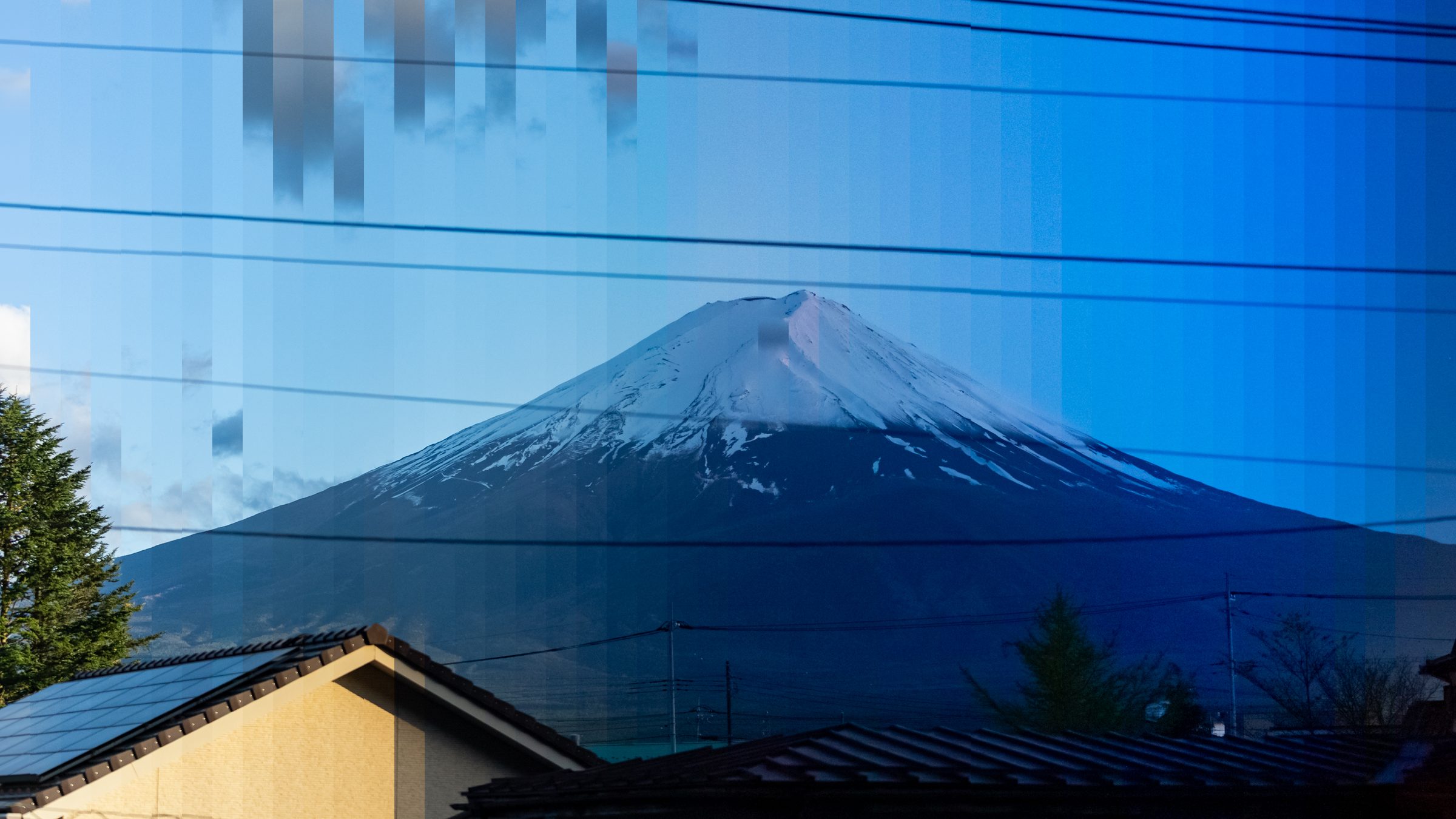
Mount Fuji, 635 RAW photos from day to night. Each vertical strip is a different moment of the time-lapse, processed with SuNight.
Lightroom can't make a setting evolve.
During a sunset, light drops by 10 to 15 stops. In Lightroom you would have to adjust every photo by hand, and the slightest mismatch shows in the video.
- Syncing a setting copies the same value everywhere: the start looks perfect, the end is black.
- Adjusting photo by photo creates visible jumps as soon as you play the video.
- Changing shutter speed or ISO while shooting causes brightness steps.
- Tiny variations in exposure and aperture make the image flicker.
The real light (grey) drops and jumps from one photo to the next. The amber curve is what you will see in the video: continuous and smooth.
Four steps, without changing your habits.
You keep Lightroom Classic for developing. SuNight only takes care of what Lightroom cannot do.
- Lightroom Classic
Edit your keyframes
Develop 2 or 3 reference photos (day, dusk, night) and give them 4 stars.
- SuNight
Analyse the folder
SuNight measures the light of every RAW and draws the curve. One click writes the settings into the XMP files.
- Lightroom Classic
Read back and export
"Read Metadata from Files", then export to JPEG as usual.
- SuNight
Build the video
ProRes 422 HQ or H.264, in 4K or Full HD, at the frame rate of your choice.
Built for long sequences.
Every setting evolves
Exposure, white balance (computed in mireds), contrast, highlights, shadows, curves, HSL, sharpening… Every numeric value glides from one keyframe to the next.
Adjustable deflicker
Light is measured on the raw sensor data, then exposure is corrected photo by photo. Strength adjustable from 0 to 100%.
Your keyframes stay untouched
SuNight never modifies a 4-star photo or a RAW file: only the .xmp files of the other photos.
One-click undo
Before every write, the XMP files are saved into an archive. One button restores them.
Built-in video
Assembles the exported JPEGs into ProRes 422 HQ (editing) or H.264 (sharing), scaled to 4K or Full HD.
100% offline
Your photos never leave your computer. Internet is used only once, to activate the license.
Pay only for the time you need.
No subscription: a license for the duration you choose, counted from its first activation. Buy it on the day you have a time-lapse to process.
- All features
- 2 computers
- Updates during the license
- Key emailed within seconds
Secure payment by Stripe: credit card, Apple Pay, Google Pay. Prices in euros, VAT included for EU customers. Receipt sent by email.
Download it, try it on 50 photos.
The trial does everything, with no time limit, on sequences of up to 50 photos. Analyse your real sequence anyway: the full curve is displayed, so you see the result before paying.
Download SuNightVersion 1.0.0 · Windows 10 & 11 (64-bit) · 67 MB
- Software: Lightroom Classic with automatic XMP writing enabled
- Photos: RAW files from most cameras (Sony, Canon, Nikon, Fujifilm, Panasonic, OM System…)
- Mac: not yet: planned for a future version
On first launch
SuNight is independent software that Windows doesn't know well yet. The SmartScreen filter may show this warning: that's normal.
Microsoft Defender SmartScreen prevented an unrecognized app from starting.
More info1Run anyway2
Click "More info", check that the app is SuNight, then "Run anyway". SuNight then installs in your user folder, without administrator rights.
Frequently asked questions
What is a "holy grail" time-lapse?
A time-lapse that goes continuously from day to night (or the other way round). While shooting, you lengthen the shutter speed and raise the ISO as light fades. In post-production, these changes must then be compensated photo by photo to get a smooth video: that is what SuNight does.
Can't Lightroom Classic do it on its own?
No. Lightroom syncs identical settings across photos, but it cannot gradually ramp a setting between two keyframes, nor remove flicker from a sequence. SuNight computes these values and writes them into the XMP files that Lightroom reads back.
Are my RAW files modified?
Never. SuNight only writes into the .xmp files (Lightroom "sidecars") of the photos that are not keyframes, after backing them up. Your keyframes and RAW files stay untouched.
When does the license period start?
At first activation in SuNight, not at payment. You can buy a 24-hour license in advance and activate it only on the evening you process your time-lapse.
On how many computers can I use it?
Two at the same time, for example a desktop and a laptop. To switch computers, click "Release this PC" in SuNight: the slot is freed immediately.
Do I need an internet connection?
Only to activate the license. After that, SuNight works fully offline and never uploads your photos.
What about Mac?
SuNight runs on Windows 10 and 11. A Mac version is planned: write to us to be notified when it is released.
Can I get a refund?
The key is delivered immediately and you waive the right of withdrawal at purchase. That is why the free trial lets you check everything before paying. If a technical problem cannot be solved, write to us and we will find a solution.